

أهلاً يا coding crew! النهارده عايزة أكلمكم عن الـ variables والـ primitive data types والـ methods بتاعتها، وإزاي بنستخدمهم في لغة Salesforce Apex. متقلقوش لو عمركم ما قريتوا عن الموضوع ده قبل كده، أو لو مش متأكدين يعني إيه variables أصلاً، أنا معاكم.
يعني إيه Variables في Salesforce؟
الـ variables مفهوم أساسي هتستخدموه كل يوم في الكود بتاعكم، وفي نفس الوقت بسيط جداً. اعتبروا الـ variable زي الخانة (cell) في شيت Excel.
| الخانة في شيت Excel | الـ Variable في Salesforce |
|---|---|
| الخانة في Excel ممكن تشيل قيمة، زي رقم أو كلمة. | الـ variable في Salesforce مكان بيشيل داتا من data type معين، زي رقم أو string أو date وهكذا. |
| عشان نشاور على خانة، بنستخدم العمود والصف بتوعها، زي A2 أو B6. | في Salesforce بندي الـ variable اسم، عشان نقدر نشاور عليه ونستخدم قيمته في الكود. |
بالمقارنة بشيت Excel، الـ variables في Salesforce أقوى بكتير. غير إنها بتشيل قيمة واحدة بسيطة، كمان تقدر تشيل data structures معقدة زي الـ arrays.
- في البوست ده هنركز على القيم البسيطة اللي فيها قيمة واحدة، ونتكلم عن أنواعها المختلفة، وعن الـ methods الجاهزة (out-of-the-box) اللي تقدروا تستخدموها معاها.
- لو مهتمين تتعلموا الـ data types المعقدة في Salesforce، شوفوا بوستي “Beginner’s Guide to Salesforce Apex: An Introduction to Collections – Lists, Sets, and Maps” (بالإنجليزي)، شرحت فيه كل تفاصيل الـ collections في Salesforce ومميزاتها. ولو عايزين بس فكرة سريعة، البوست اللي قبله “Essential Salesforce Developer Vocabulary for Beginners” (بالإنجليزي) فيه وصف سريع للـ Maps والـ Lists والـ Sets.
الـ Declaration والـ Initialization واستخدام الـ Variable
فيه كلمتين هتسمعوهم كتير وإنتو شغالين بالـ variables في Salesforce: ‘declaration‘ و’initialization‘.
الـ Variable Declaration
معناها إنكم تحددوا نوع الـ variable واسمه. ده مثال بيوضح إزاي نعرّف (declare) variable:
- هتلاحظوا إننا مدّيناش الـ variable أي قيمة في الأول.
- قيم الـ variables في المثال ده هتبقى NULL (فاضية).
//This is how we would declare a variable
//Variable_Data_Type variableName;
//1. Variable_Data_Type: this would be the type of the variable you need (simple or complex)
//2. variableName : this would be the variable name that you will use to access it in the code

//Examples:
Integer studentAge; //Variable of type Integer and name studentName
Decimal averageMarks; //Variable of type Decinmal and name averageMarks
الـ Variable Initialization
معناها إنكم تحددوا القيمة الأولى للـ variable. ده مثال بيوضح إزاي نعمل initialize لـ variable (يعني نعمله declare ونديله قيمة default):
Integer studentAge = 18; //Variable of type Integer,name studentName & default value 18
Decimal averageMarks = 22.3;//Variable of type Decinmal, name averageMarks & default value 22.3
استخدام الـ Variable
بعد ما نعمل declare أو initialize للـ variable:
- نقدر نغير قيمته في الكود في أي وقت.
- القيمة الجديدة لازم تكون من نفس الـ data type اللي عرّفنا بيه الـ variable.
Integer studentAge=19;
.....
.....
studentAge = 20; //Change the studentAge value from 19 to 20

//Variable declaration only without initialization
Decimal averageMarks;
....
.....
averageMarks = 22.7; //before that line averageMarks was NULL, set its value to 22.7
يعني إيه Primitive Data Types؟
كل variable ليه data type معين. الـ primitive data types في Salesforce بتمثل قيم أساسية فيها قيمة واحدة، زي الأرقام والـ strings والـ booleans والـ dates وهكذا.
مهم تعرفوا إيه هي الـ primitive data types المختلفة في Salesforce، لأنكم هتستخدموها كتير جداً.
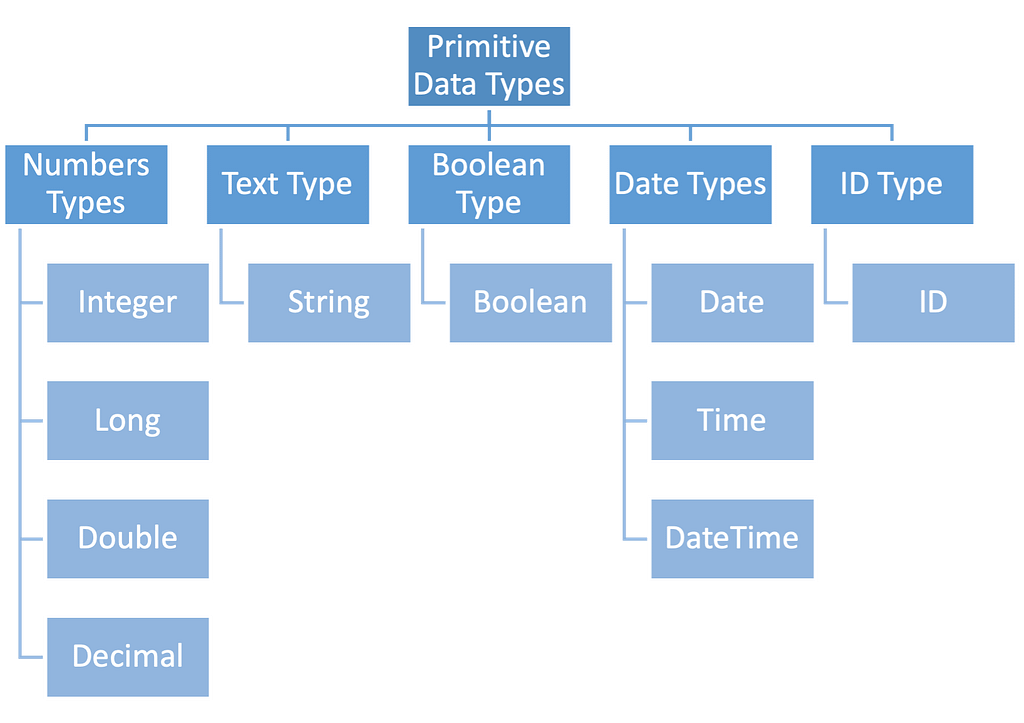
أنواع الأرقام (Number Types)
الـ data types بتاعة Integer وLong وDouble وDecimal بنستخدمها عشان نخزن أرقام، سواء صحيحة أو عشرية. زي مثلاً: السن، المرتب، المتوسط، المجموع، وهكذا.
الـ Integer والـ Long
الاتنين Integer وLong بنستخدمهم عشان نخزن أرقام صحيحة (من غير علامة عشرية).
| Integer Data Type | Long Data Type |
|---|---|
| نطاق أصغر: -2,147,483,648 لحد 2,147,483,647 | نطاق أكبر: -9,223,372,036,854,775,808 لحد 9,223,372,036,854,775,807 |
| الـ Integer variables بتاخد memory أقل | الـ Long variable يقدر يشيل أرقام أكبر |
أمثلة على تعريف Integer variable وLong variable:
//declare an Integer variable with name intValue and initialize it with a whole number 10
Integer intValue = 10;

//declare a Long variable with name longValue and initialize it with a whole number 1234567890
//notice the "L" after the whole number, this to indicate that the number is treated as long
Long longValue   = 9223372036854775807L;
خلوا بالكم لما تحطوا رقم كبير أوي في Long variable من غير حرف الـ ‘L’. لو محطتوش الـ ‘L’، ممكن يطلعلكم error بيقول ‘Illegal Integer’. فدايماً حطوا الـ ‘L’ في آخر القيمة لما تكونوا شغالين بـ Long variables.
//9223372036854775807 is exceeding the Integer range
//We didn't include the L character at the end of the number
Long longValue   = 9223372036854775807;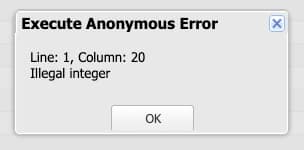
الـ Double والـ Decimal
الاتنين Double وDecimal بنستخدمهم عشان نخزن أرقام عشرية.
| Double Data Type | Decimal Data Type |
|---|---|
| زي مسطرة بتقيس لحد 15 رقم بعد العلامة العشرية | زي مسطرة أدق بتقيس لحد 18 رقم بعد العلامة العشرية. |
| بياخد memory أقل | بياخد memory أكتر |
| الحسابات بيه أسرع | الحسابات بيه بتاخد وقت أطول |
| اختيار كويس لو شغالين على داتا كتير أو محتاجين تعملوا حسابات بسرعة. | اختيار كويس لو محتاجين دقة عالية، أو شغالين على داتا مالية ممكن فيها أي غلطة صغيرة تعمل مشكلة كبيرة. |
المثال اللي جاي هيوضح إزاي الاتنين بيتصرفوا بشكل مختلف لما نديهم قيمة فيها 17 رقم بعد العلامة العشرية، زي 3.14159265358979396.
//define a decimal variable and print its value
//the 3.14159265358979396 has 17 decimal points
Decimal decimalValue = 3.14159265358979396;
System.debug('The Decimal Value of 3.14159265358979396 is: '+decimalValue);

//define a double variable and print its value
//the 3.14159265358979396 has 17 decimal points
Double doubleValue = 3.14159265358979396;
System.debug('The Double Value of 3.14159265358979396 is: '+doubleValue);
- الـ Decimal طبع الرقم زي ما هو، من غير ما يقربه.
- الـ Double قرّب الرقم لأقرب قيمة ممكن تتمثل بـ 15 رقم بعد العلامة العشرية.
النصوص (String)
الـ String هو data type بيمثل مجموعة حروف ورا بعض، زي كلمة أو جملة. وممكن كمان تحطوا أرقام جوه الـ string.
- قيم الـ String بنحطها بين single quotes (”)، كده:
String welcomeText = 'Hello, coding crew to my blog number 2!';- تقدروا تستخدموا الـ concatenation operator ‘+’ عشان تجمعوا كذا string في variable واحد
String firstName = 'Sally';
String lastName = 'Elghoul';
String welcomeNote = 'Welcome to my blog : '+ firstName + ' ' + lastName;
System.debug('Welcome Note Value: ' + welcomeNote);
الـ Boolean
الـ Boolean هو data type ليه قيمتين بس: true أو false.
الـ Booleans بنستخدمها كتير في البرمجة عشان ناخد قرارات. يعني بتتستخدم كتير في الـ conditional statements عشان نحدد إيه اللي المفروض يحصل. هنشرح الـ conditional statements بالتفصيل في بوست جاي، فخليكم متابعين!
//compare if 3 is bigger then 2
//and return true or false in isThreeBigger
Boolean isThreeBigger = (3>2);
System.debug('isThreeBigger Value : '+isThreeBigger);

//check that firstName is equal to lastName
//and return true or false in isEqualValue
String firstName ='Sally';
String lastName  ='ElGhoul';
Boolean isEqualValue = (firstName==lastName);
System.debug('isEqualValue value: '+isEqualValue);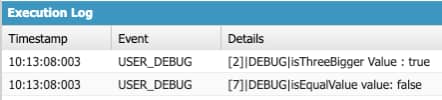
أنواع التاريخ والوقت (Date Types)
الـ data types بتاعة Date وTime وDateTime بنستخدمها عشان نمثل قيم ليها علاقة بالتاريخ، سواء تاريخ بس، أو وقت بس، أو تاريخ ووقت مع بعض.
Date
الـ Date بيمثل تاريخ من غير وقت. ممكن نستخدمه لأعياد الميلاد، أو المواعيد النهائية (deadlines)، أو أي داتا فيها تاريخ بس ومش فارق معانا الوقت.
//Declare a variable of type Date, give it name todayDate
//Initialize the date variable with today's date..
//Date.today() is one of the methods available to use with the Date data types
Date todayDate = Date.today();
System.debug('Today date is: ' + todayDate);
Time
الـ Time بيمثل وقت معين في اليوم من غير تاريخ. مفيد لما نحسب مدة event زي meeting مثلاً.
//Declare a variable of type Time, give it name customTime
//Initialize the customTime using newInstance
//newInstance is a method available for the Time class
//newInstance parameters (Integer hour, Integer minutes, Integer seconds, Integer milliseconds)
Time customTime = Time.newInstance(9, 30, 0, 0);
System.debug('The appointment time is: ' + customTime);
DateTime
الـ DateTime بيمثل تاريخ ووقت مع بعض.
- ممكن نستخدم الـ DateTime عشان نمثل events أو transactions أو ميعاد بداية meeting، أو أي داتا فيها تاريخ ووقت.
- مهم تفتكروا إن كل قيم الـ DateTime بتتخزن بتوقيت UTC (Coordinated Universal Time).
- يعني لو عملنا DateTime جديد في Apex، هيتحول تلقائياً لتوقيت UTC ويتخزن كده في الـ database.
- الكود اللي تحت مثال بيوضح إن الـ DateTime بيتطبع على الشاشة بتوقيت UTC by default، واضطريت أستخدم الـ method اللي اسمها format() عشان أعرضه بتوقيت المنطقة بتاعتي.
//Declare a variable of type DateTime, give it name currentDateTime
//Initialize the date variable with the current date time value
//DateTime.now() is one of the methods available to use with the DateTime data types
DateTime currentDateTime = DateTime.now();

//this debug statement will print the date time in UTC format
System.debug('The current date and time UTC: ' + currentDateTime);

//this debug statement will display the time in my current time zone
//using format() Converts the date to the local time zone
System.debug('The current date and time Est: '+currentDateTime.format());

الـ ID
الـ ID هو data type بنستخدمه عشان نمثل الـ unique identifier بتاع أي record في الـ database بتاعة Salesforce، واللي عادةً بنسميه record Id.
الـ record Id بيتعمل لوحده لما تعملوا record من أي نوع، ومينفعش تغيروا قيمته.
//Declare a variable for Account data type (We will cover that in later blog)
//Set the Account Name field
Account accountCodeWithSally = new Account(Name='Code With Sally');

//Insert the account
insert accountCodeWithSally;

//Declare a variable of data type ID, and give it a name codeWithSallyID
//Initialize the ID variable codeWithSallyID with the account record ID we just created
ID codeWithSallyID = accountCodeWithSally.Id;

//Print the ID variable
System.debug('The ID of Code With Sally account is: ' + codeWithSallyID);
الـ Methods بتاعة الـ Primitive Data Types
في Salesforce، كل primitive data type (زي Integer وDouble وString وDateTime وغيرهم) عامل زي “class” مخصوص، جاي معاه مجموعة built-in methods نقدر نستخدمها عشان نعمل حاجات مختلفة بالداتا. الـ methods دي زي أدوات جاهزة بتخليكم تعدلوا الداتا أو تحسبوها بطرق مختلفة.
متحمسة أشارككم عينة صغيرة من الـ methods دي. ومهم تعرفوا إن فيه methods تانية كتير لكل data type ممكن تفيدكم في حاجات معينة. بصوا على الـ resources تحت عشان تعرفوا أكتر!
| Data Type | الـ Method واستخدامها | مثال |
|---|---|---|
| Integer | valueOf(StringValue) بترجع Integer فيه قيمة الـ String اللي بعتناها. | Integer intValue = Integer.valueOf(‘567’); |
| Decimal | intValue() بترجع القيمة الصحيحة (integer) من الـ decimal | Decimal decimalValue = 3.456; System.debug(‘Value: ‘ + decimalValue.intValue()); Output : 3 |
| Decimal | round() بترجع قيمة long. القيمة اللي بترجع هتبقى رقم متقرب من غير أرقام عشرية. طريقة التقريب اسمها ‘half-even’، يعني أي رقم بيتقرب لأقرب رقم ليه، ولو الرقم فيه .5 بيتقرب لأقرب رقم زوجي. | Decimal decimalValue1 = 8.5; System.debug(‘Value: ‘ + decimalValue1.round()); Output : 8 (أقرب رقم زوجي) Decimal decimalValue2 = 3.5; System.debug(‘Value: ‘ + decimalValue2.round()); Output : 4 (أقرب رقم زوجي) Decimal decimalValue3 = 8.7; System.debug(‘Value: ‘ + decimalValue3.round()); Output : 9 (الأقرب) |
| Date | addDays(NoDays) addMonths(NoMonth) addYears(noYears) الـ methods دي بترجع قيمة Date، ووظيفتها إنها تزوّد عدد ‘X’ من الأيام أو الشهور أو السنين على تاريخ معين. | Date todayDate = Date.Today(); Date tomorrowDate = todayDate.addDays(1); System.debug(‘Tomorrow : ‘+tomorrowDate); لو النهارده 12 April, 2023 Output : ‘Tomorrow : 2023-04-13 00:00:00’ |
| String | toLowerCase() toUpperCase() بترجع String كل حروفه small أو capital | String helloText = ‘Hello Coding Crew!’; System.debug(‘Lower:’+helloText.toLowerCase()); Output: ‘Lower:hello coding crew!’ System.debug(‘Capital:’+helloText.toUpperCase()); Output: ‘Capital:HELLO CODING CREW!’ |
| String | trim() بترجع نسخة من الـ string من غير أي مسافات في أوله أو آخره. | String helloText = ‘ Hello Coding Crew! ‘; System.debug(‘Text:’+helloText.trim()); Output: ‘Text:Hello Coding Crew!’ |
| String | contains(substring) بترجع true لو الـ String فيه الـ substring اللي بعتناه. | String helloText = ‘Hello Coding Crew!’; System.debug(‘Value:’+helloText.contains(‘Crew’)); Output : ‘Value:true’ |
| String | removeEnd(substring) removeStart(substring) الـ ‘removeEnd’ بتشيل الـ substring من آخر الـ String، والـ ‘removeStart’ بتشيله من أوله. | String helloText = ‘Test Hello Coding Crew! Test’; System.debug(‘Start:’+helloText.removeStart(‘Test’)); Output : ‘Start: Hello Coding Crew! Test’ System.debug(‘End:’+helloText.removeEnd(‘Test’)); Output : ‘End:Test Hello Coding Crew!’ |
الخلاصة
في البوست ده اتكلمنا عن أساسيات الـ primitive data types في Salesforce Apex. بدأنا بتعريف الـ variable، وإزاي هو مكان بيشيل نوع معين من الداتا، زي الخانة في شيت Excel.
بعد كده قسمنا واتكلمنا عن الأنواع المختلفة للـ primitive data types في Salesforce Apex، زي Integer وLong وDecimal وDouble وBoolean وDate وTime وDateTime.
وفي الآخر شفنا عينة من الـ methods اللي ممكن نستخدمها زي “addDays(NoDays)” و”round()”. الـ methods دي بتساعدنا نتعامل مع الداتا اللي متخزنة في الـ variables بتاعتنا.
لما تفهموا الـ primitive data types المختلفة في Salesforce Apex وإزاي تستخدموها صح، هتكتبوا كود أكفأ وأدق بيعمل الحسابات والعمليات اللي محتاجينها. واختيار الـ data type الصح والـ methods المناسبة هيساعدكم توصلوا لهدفكم وتنجحوا في الـ projects بتاعتكم.